
1099s
What each 1099 vendor was paid this year, what's missing to file, and which accounts feed each 1099 box.
In the app: Purchases › 1099s
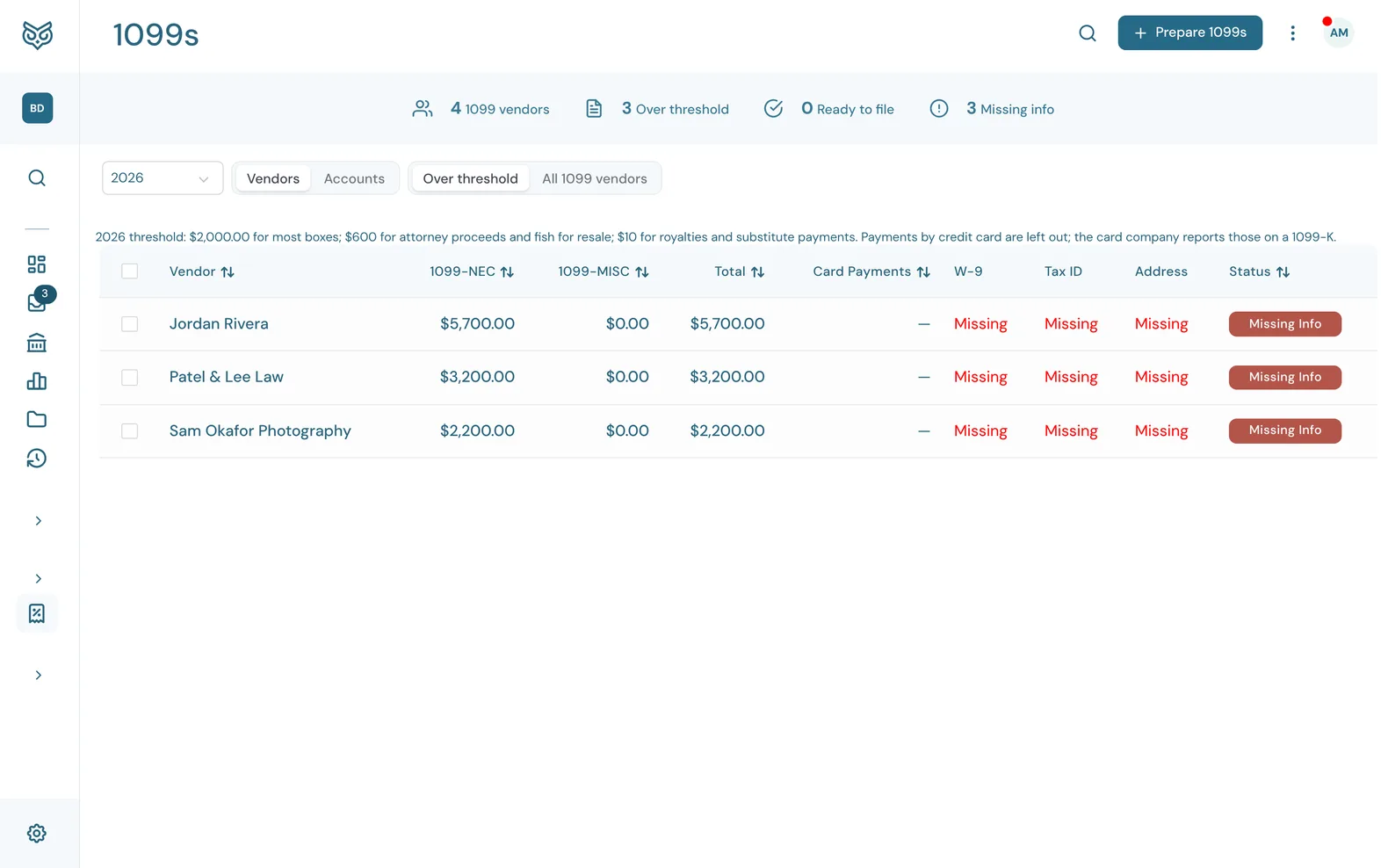
The 1099s page gets you ready for 1099 season. It shows what each vendor you file a 1099 for was paid in the year, and flags anything you still need from them.
Before you start
WizeBooks counts a payment toward a 1099 only when two things are true:
- The vendor has Track payments for 1099 turned on (see Vendors).
- The payment is on an account mapped to a 1099 box, such as Contract Labor to 1099-NEC Box 1 or Rent to 1099-MISC Box 1. Map accounts on the Accounts tab here, or with 1099 box on the account in the Chart of Accounts.
Until at least one account is mapped, the Vendors tab shows $0 for everyone and a Map accounts button.
The top of the page

- Year: the tax year. From January to March it opens on last year, the one you're filing.
- Vendors and Accounts switch between the two tabs.
- Over threshold shows only vendors who reached the year's threshold; All 1099 vendors shows everyone marked for 1099.
- Prepare 1099s opens the steps to prepare and print the year's forms (see Preparing and printing 1099s).
- Request W-9 appears when you tick vendors, and emails each one a W-9 link.
- The stat band: 1099 vendors, Over threshold, Ready to file and Missing info.
The Vendors tab
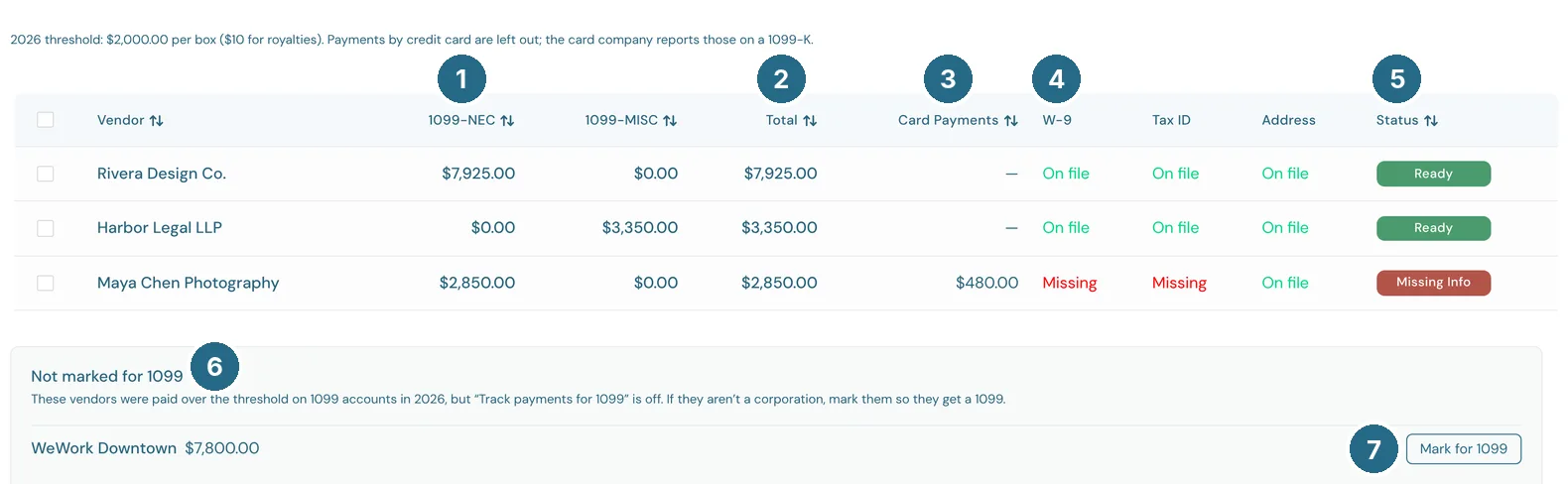
- 1099-NEC and 1099-MISC: what each vendor was paid on accounts mapped to each form.
- Total: both together.
- Card payments: what you paid them by credit card. It's left out of the totals, because the card company reports it on a 1099-K.
- W-9, Tax ID and Address: On file or Missing.
- Status: Ready when they're over the threshold with a tax ID and full address, Missing info when something's missing, or Below threshold.
- Not marked for 1099 lists vendors who were paid over the threshold on 1099 accounts but don't have Track payments for 1099 on.
- Mark for 1099 turns it on. Leave corporations off, except attorneys and medical providers.
Each row is one vendor marked for 1099. Click a vendor to open their page and fill in what's missing. The line above the list gives the year's threshold.
How payments are counted
- By payment date, not bill date. A bill entered in December and paid in January counts in January's year.
- Bill payments are split over the bill's lines. Paying a $1,000 bill that's half rent and half supplies counts $500 toward rent.
- Expenses and checks count on the date they were paid.
- Thresholds: $600 per box for 2025 and earlier. From 2026 most boxes are $2,000, but attorney proceeds (MISC 10) and fish for resale (MISC 11) stay $600. Royalties (MISC 2) and substitute payments (MISC 8) are $10, and fishing boat proceeds (MISC 5) and golden parachute payments (NEC 3) count at any amount. A vendor gets a 1099 when any box reaches its threshold.
The Accounts tab
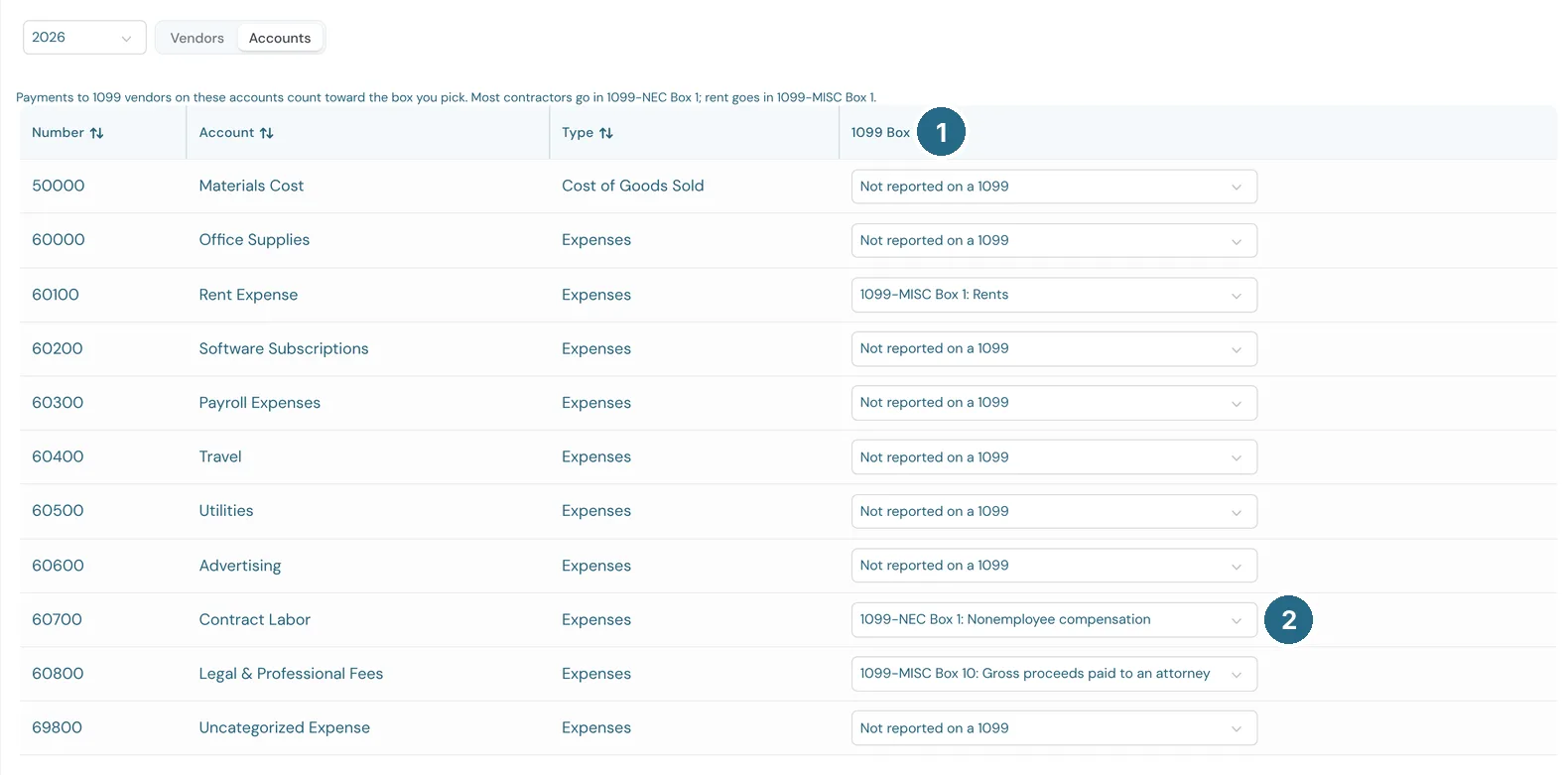
- 1099 box: every expense, cost of goods sold and other expense account has one.
- Pick the box payments on that account belong in, or Not reported on a 1099. It saves as soon as you pick.
| Box | Use it for | |---|---| | 1099-NEC Box 1 | Contractors and freelancers paid for services | | 1099-NEC Box 3 | Excess golden parachute payments (1099-MISC Box 14 before 2026) | | 1099-MISC Box 1 | Rent | | 1099-MISC Box 2 | Royalties | | 1099-MISC Box 3 | Other income, such as prizes and awards | | 1099-MISC Box 5 | Fishing boat proceeds | | 1099-MISC Box 6 | Medical and health care payments | | 1099-MISC Box 8 | Substitute payments in lieu of dividends or interest | | 1099-MISC Box 9 | Crop insurance proceeds | | 1099-MISC Box 10 | Gross proceeds paid to an attorney, such as a settlement paid through them | | 1099-MISC Box 11 | Fish bought for resale with cash | | 1099-MISC Box 12 | Section 409A deferrals | | 1099-MISC Box 15 | Nonqualified deferred compensation |
The checkboxes, tax withheld, state boxes and the 2026 tips and overtime boxes aren't on the list, because they aren't money paid on an account. You'll fill those in per vendor when you prepare the forms.
Preparing and printing 1099s
Prepare 1099s walks you through three steps for the year you pick.
- Your company: the payer details printed on every form. Use the company's Legal name if it's different from the name in WizeBooks, and its EIN, address and phone. The EIN fills in from Company Profile when it's there, and is stored encrypted. Only an owner or admin can change these.
- Vendors: one line per form the books call for, a 1099-NEC, a 1099-MISC, or both. A vendor is ticked when they reached the threshold on that form and have a tax ID and full address on file. Vendors missing a tax ID or address can't be ticked until you add it on their page. Show under the threshold lists the rest, in case you want to send one anyway.
- Edit changes a form's box amounts, adds Federal income tax withheld, ticks the direct sales of $5,000 or more box, and adds state details (state, your state ID number, state income and state tax withheld). Use the books puts the amounts back. - Save and continue saves the ticked forms. You can come back and change them, and the saved amounts are what print.
- Print: pick the paper first.
- Plain paper: WizeBooks prints the whole form, two per page. - Official IRS forms: prints only the names, numbers and amounts, into the boxes of the official forms you buy (from tax year 2026 on). Each sheet holds two forms, and 1099-NEC and 1099-MISC go on their own paper. Print at 100% (Actual size), not Fit to page. - Copy A (official forms only) goes on the red Copy A sheets, mailed to the IRS with Form 1096. - Copy B goes to each vendor by January 31. Their tax ID shows only the last four digits, as the IRS allows. On plain paper, instructions for the recipient print at the end. - Copy C is for your records. An owner or admin sees vendors' full tax IDs on it, and printing it is noted in Activity. - Copy 1 and Copy 2 show when a form has state details, for states that ask for them.
Lining up your printer
With Official IRS forms, Line up your printer prints a test sheet for each form on plain paper, with every box outlined. Hold it over an official form against a window. If the outlines sit off the boxes, enter how far to Move right or Move down in inches (a minus number moves left or up), Save, and print the test sheet again. The setting is saved for everyone in the company.
On plain paper, Copy A isn't offered: the IRS doesn't accept it on plain paper. File it free through the IRS's IRIS portal at irs.gov/iris, or on the red official forms, by January 31. If you have 10 or more information returns in all, you must file electronically.
Reports
Two reports in Reports › Expenses and vendors use the same numbers:
- 1099 Contractor Summary: one row per vendor with a column for each box that has payments, and a total.
- 1099 Transaction Detail: every payment behind those totals, grouped by vendor. Click a payment to open it.
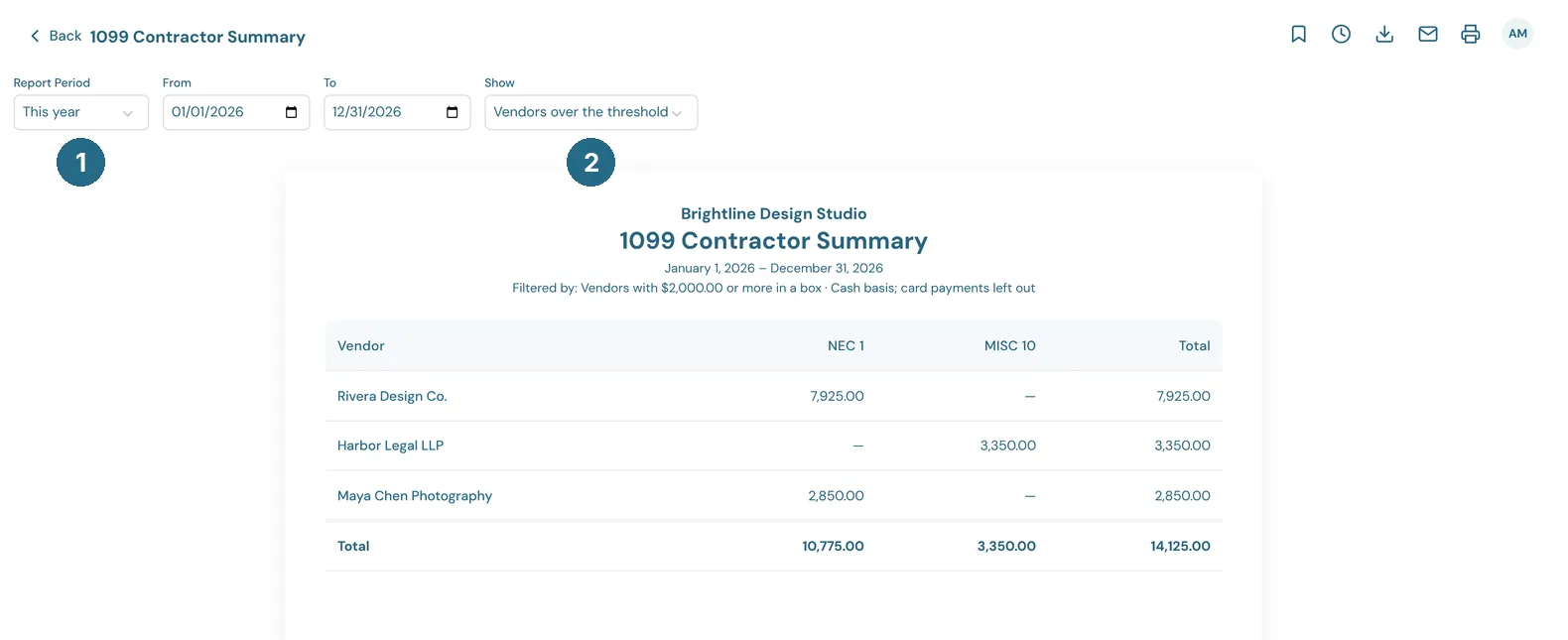
- Report Period: the year to report on. From and To set your own dates.
- Show: Vendors over the threshold or All 1099 vendors.
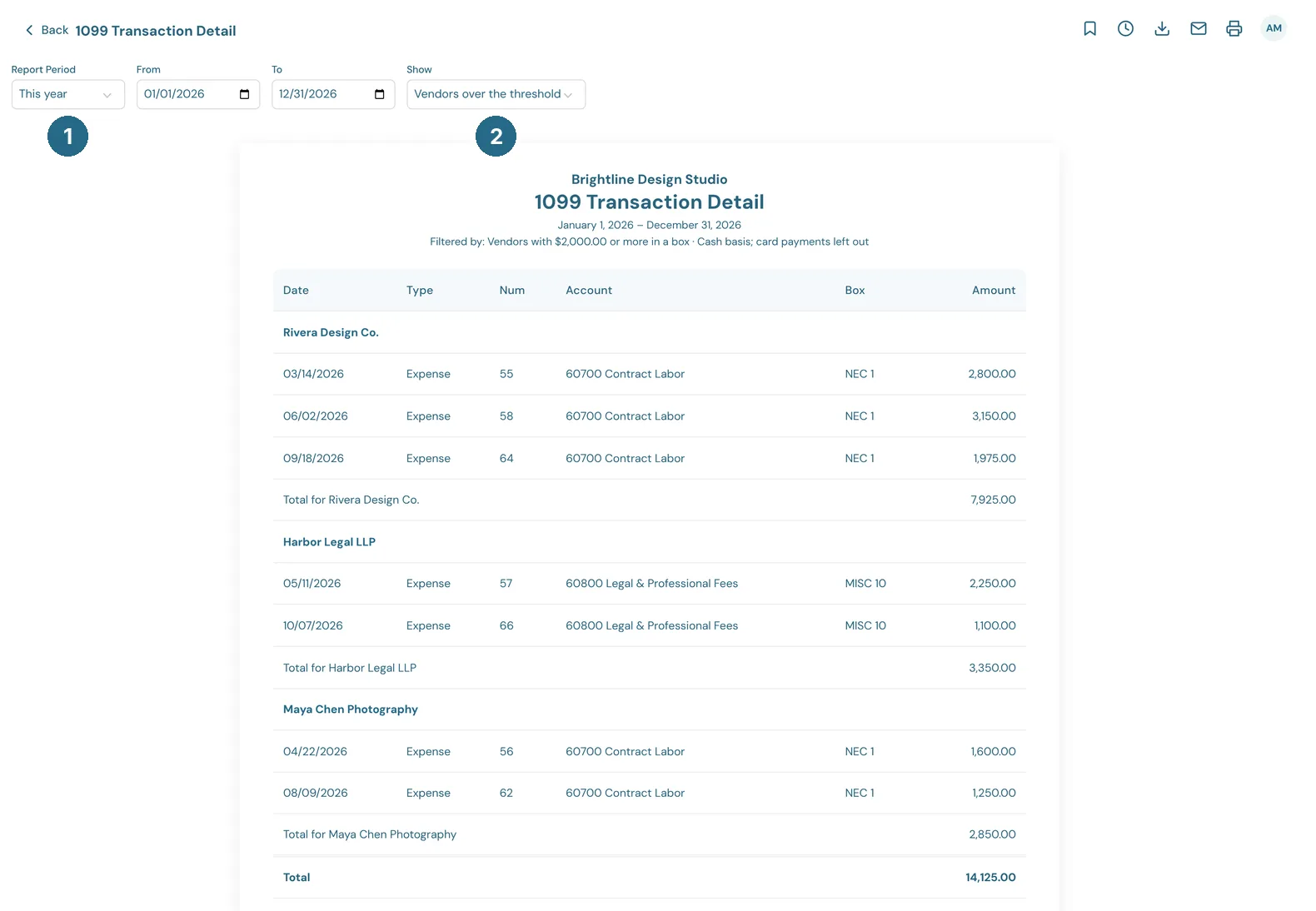
The Transaction Detail has the same Report Period and Show controls.
Both open on last year. They don't have Period Frequency or Compare to, since a 1099 covers one calendar year.
Updated in v1.0.0